

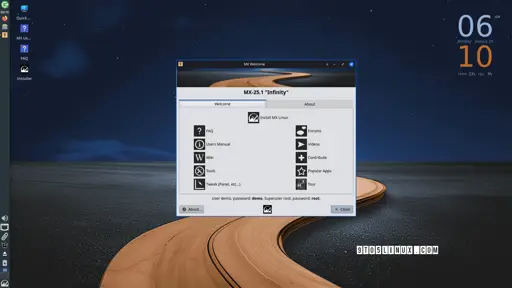
The MX Linux team announced today the general availability for download of MX Linux 25.1 as the first update in the MX Linux 25 “Infinity” series of this Debian-based distribution featuring Xfce, KDE Plasma, and Fluxbox flavors.
After a quick, one-week beta testing phase, MX Linux 25.1 is now available for download based on the latest Debian 13.3 “Trixie” operating system and featuring the long-term supported Linux 6.12 LTS kernel on the standard ISOs and Linux 6.18 LTS on the AHS (Advanced Hardware Support) ISOs.
The biggest attraction of the MX Linux 25.1 release, compared to MX Linux 25, is the dual-init support, which means that both systemd and SysVinit are now included in the ISO images, allowing users to choose the init system they want to boot MX Linux with from the live boot menu of the live system.
Only downside is Debian 13 will likely forever be stuck with KDE 6.3.6, which has some noticeable bugs on my hardware that make Cinnamon more appealing for an LTS distro.
KDE really benefits from distros that keep it more up to date, to the point where even the KDE devs suggest avoiding KDE on Debian.
Ah I see, thank you, well I have no showstopping problems with Cinnamon in particular, I would just like a bit more control, Cinnamon’s customization options are a bit slim, although maybe I should just leave well enough alone as I have had few problems and everything seems to be running well. I guess I’ll see when I get into some more demanding tasks.
Yeah, I get what you mean. When I ran KDE, I liked to have a tiny notifications/clock bar at the bottom right of the screen that would autohide, and an icons only application bar on the left, but since cinnamon only allows desktop bars that stretch across the entire screen, I’ve had to adapt to a more Unity like layout where I have both a top bar and a side bar. Though at this point I’ve adapted to it to the point where I think I’ve ended up preferring that setup over my old one :p
I also wish that Cinnamon hadn’t waited so long to start working on Wayland, though hopefully that’ll be ready in a couple years or so.
Still, as you say, everything mostly just works without any issue, so it’s hard to justify switching away.
Two bars… well that’s a thought, screens are so large now and a lot of times that space is just empty anyways, I rarely have anything maximized on my main monitor. Hmmm.
I now remember my main gripe with Cinnamon, it doesn’t remember window positions when turning off monitors, so if I turn off my main monitor first, all the windows will be on the secondary display next time I return to the PC and I have to drag the windows back to where they were. I suppose I’ll just have to remember to turn the secondary off first where I normally only have one or two windows. It looks like there is a Cinnamon spice extension that addresses this but the reviews are not glowing. But yeah, since everything else has been great hardware and software wise, maybe I’ll just deal with it.
I had the same thought regarding modern screen sizes. And since I rarely need extra width on a 16:9, the I can keep the side bar quite thick to make the buttons easier to click, while making the top bar thinner to maximize vertical reading space on a browser. With the Time/Date/Weather all positioned in the middle of the top bar like Gnome defaults to, Start Menu on the left, and notifications on the right, it’s actually pretty slick looking.
Ah, that sucks about the window position thing. I usually keep my second monitor off, so I haven’t noticed that issue yet. From what I recall, KDE can remember window positions under X11, but not quite yet on Wayland (though there is also an addon that adds that functionality under Wayland, which might be more polished than the one for Cinnamon).